
← All plugins

Six Walls

Plugin · VST3, AU & AAX

The FortyTwo™

A two-channel rack enhancer from the early '90s, the BBE 422A Sonic Maximizer (unofficial), measured from a real unit and modeled warts and all: the Lo-Contour and Definition knobs, the little row of Hi-Contour lights, and the Auto switch, which turns the top end down when the music already has plenty. Hold a key to flip In/Out while you tweak, the way a hand on the real switch would. Free for Windows and macOS.

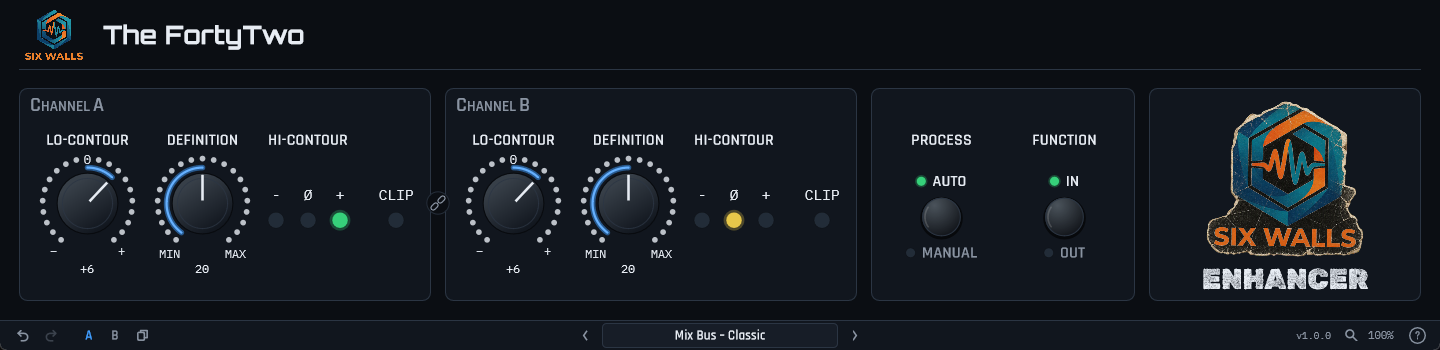
The FortyTwo plugin UI: Channel A and Channel B, each with Lo-Contour and Definition knobs and red, amber, and green Hi-Contour lights with a CLIP light, Process (Auto / Manual) and Function (In / Out) push buttons, The FortyTwo logo panel, and the standard Six Walls toolbar
Before you download Six Walls is one person building these in his spare time and giving them away.

Windows: the installers are code-signed — verified publisher Edwin Jones. A fresh signing certificate takes a little while to build reputation with SmartScreen, so for the first few weeks you may still see a “not commonly downloaded” note — click More info → Run anyway.

macOS: the .pkg and the bundle .zip are signed with a Developer ID and notarized by Apple, so they open with no Gatekeeper prompt. Universal — Apple silicon and Intel.
Watch It A quick introduction to The FortyTwo

Every part of The FortyTwo was measured on the unit, both channels separately: the frequency and phase response at every knob position, how fast Auto reacts and to what, and even the lights, which were filmed frame by frame and fitted to the video. Then it was checked by ear against the hardware, side by side, on drums, guitars, voices, and full mixes.

  • Lo-Contour — bottom end added in the way the hardware does it, as a low-passed copy of the signal mixed back in rather than a shelf. From about −12 to +10 dB at 50 Hz.
  • Definition — the top end, lifted and moved forward in time by the unit’s phase shaping. Up to about +9 dB at 5 kHz.
  • Auto — a detector listens to the output and backs the top off when there’s already plenty of it. It reacts at two speeds at once, so it moves with the drums instead of pumping.
  • Hi-Contour lights — red, amber, and green, reading the incoming low band against the high band, quirks included. They work in bypass, because the real ones do.
  • Stereo Link — our addition, off by default: channel B follows A, and in Auto both sides get the same amount of top end, so the image can’t wander.
  • Both channels modeled separately, because the unit’s two channels aren’t identical either. Factory presets included, plus user presets, A/B, and undo.
  • Runs oversampled and reports its small latency to your DAW. Passes pluginval at strictness 10.

Hear it — dry, the real unit, and The FortyTwo

Each clip went through the hardware and through the plugin with the same settings, Auto on. The hardware takes were recorded through the interface; the plugin takes are rendered by the plugin’s own DSP. The full-mix hardware take is turned up 0.3 dB to match levels.

Toms · Definition 22
Dry
Hardware
The FortyTwo
Drum overheads · Lo-Contour −6, Definition 24
Dry
Hardware
The FortyTwo
Bass · Lo-Contour +10, Definition 22
Dry
Hardware
The FortyTwo
Full mix · Lo-Contour +6, Definition 20
Dry
Hardware
The FortyTwo
VST3 AU AAX Windows macOS JUCE 8 v1.0.1

Get It! downloads the Six Walls Installer, the easiest way to install The FortyTwo, keep it up to date, and hear about new releases. Prefer to install plugins one at a time? Every platform’s installers and zips are under Individual downloads on the Support page. Full manual on the Support page.

Questions about The FortyTwo

What is The FortyTwo modeled on?

The BBE 422A Sonic Maximizer (unofficial), a two-channel rack enhancer from the early '90s. Both channels were measured on a real unit, including the Lo-Contour and Definition knobs, the Hi-Contour lights, and the Auto switch.

What is different about this and the hardware?

Two additions. Hold-to-flip lets you A/B the way you do on the hardware: hold a key and the In/Out switch flips, let go and it snaps back, so one hand can tweak while the other compares. Stereo Link makes channel B follow channel A, and in Auto it sets the amount of top end from the louder side, so a hard-panned hi-hat doesn't pull the stereo image around. Stereo Link is off by default, and the default sound is the unit's.

How do I A/B it without clicking In/Out every time?

On the hardware you press In/Out with one hand while you tweak the knobs with the other. With a mouse that's clumsy, so The FortyTwo has a hold-to-flip key. Hold the backtick key (`) with the pointer over the plugin window and Function flips to the opposite setting. Let go and it snaps back. Right-click Function to pick a different key if your DAW claims the backtick, or to turn the feature off.

What does Auto do?

The unit listens to its own output and backs the top end off when there is already plenty of it, then opens up when there isn't. In Manual, Definition sets a fixed amount instead.

Is it really free, and what formats does it come in?

Free, no account, and no catch. VST3, AU, and AAX for Windows and macOS. The Six Walls Installer is the easiest way to get it and keep it updated, or you can grab individual installers from the Support page.

Disclaimer: Six Walls plugins are provided free of charge on an “as-is” basis — use them at your own risk, and always work on a copy of your session. The FortyTwo is an unofficial model of a unit Six Walls owns and measured, not affiliated with or endorsed by BBE. BBE and Sonic Maximizer are trademarks of their respective owners.