
← All plugins

Six Walls

Plugin · VST3, AU & AAX

The ValveStage™

A tube microphone and instrument preamp, measured from a real PreSonus TubePre (unofficial) and modeled warts and all: one tube stage that does every bit of the distortion, a Gain dial that comes after it and stays clean, and the Drive and Pad in front of it that decide how hard the tube gets hit. Free for Windows and macOS.

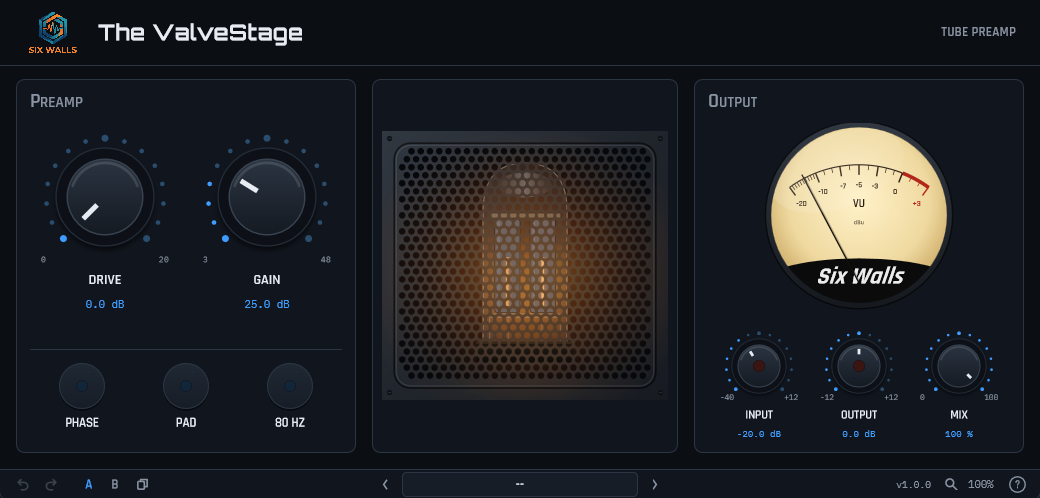
The ValveStage plugin UI: Drive and Gain knobs with Phase, Pad, and 80 Hz buttons, a glowing tube behind a grille, a VU meter, Input, Output, and Mix knobs with clip lights, and the standard Six Walls toolbar
Before you download Six Walls is one person building these in his spare time and giving them away.

Windows: the installers are code-signed — verified publisher Edwin Jones. A fresh signing certificate takes a little while to build reputation with SmartScreen, so for the first few weeks you may still see a “not commonly downloaded” note — click More info → Run anyway.

macOS: the .pkg and the bundle .zip are signed with a Developer ID and notarized by Apple, so they open with no Gatekeeper prompt. Universal — Apple silicon and Intel.
Watch It A quick introduction to The ValveStage

The ValveStage was measured on the unit: the gain and the taper of both dials, the pad, the 80 Hz filter, the way the distortion grows with level, and the point where the output stage runs out of road. Then it was checked against the hardware, signal for signal, on drums, bass, guitars, and voices. What it found is simpler than you might expect, and the plugin is built the same way.

  • One tube stage — every bit of the distortion comes from it, and it depends only on how much level reaches it. Gain does not change it, which is why the same settings sound the same at any Gain.
  • Gain — the unit’s own dial, after the tube and clean. The knob follows the real taper, +8.9 to +49.1 dB. (The numbers printed on the dial, 3 to 48, are not decibels.)
  • Drive — up to +19.3 dB in front of the tube. More Drive, harder tube.
  • Pad, 80 Hz, and Phase — a 19.2 dB pad before the tube, the unit’s one-pole 80 Hz filter, and polarity reverse. Pad plus Gain is how you get a clean sound that stays clean.
  • The unit’s own clip — the output stage clips hard at +21.3 dBu, wherever Gain and Drive are set, and the Output light follows the hardware’s clip light at +20 dBu.
  • Our additions — Input, Output, and Mix knobs, an Input clip light, and nine factory presets that set the Input for you, plus user presets, A/B, and undo. Input is the one that matters: a DAW track is far hotter than a microphone, so Input stands in for the distance.
  • Honest about what it isn’t — the meter on our unit would not move, so it is a generic VU, not a copy. One tube model (a second tube measured the same). Only the XLR path is modeled.
  • Runs oversampled and reports its small latency to your DAW. Passes pluginval at strictness 10.

Hear it — dry, the real unit, and The ValveStage

One bass part, run through the TubePre and through the plugin with the same settings: Pad on, Drive all the way up, and Gain at 11.2 dB. The hardware take was recorded through the interface; the plugin take is rendered by the plugin itself. All three peak below full scale, and the plugin take is turned down 1.6 dB so it is exactly as loud as the hardware.

Bass · Drive maxed, Pad on
Dry
Hardware
The ValveStage
VST3 AU AAX Windows macOS JUCE 8 v1.0.0

Get It! downloads the Six Walls Installer, the easiest way to install The ValveStage, keep it up to date, and hear about new releases. Prefer to install plugins one at a time? Every platform’s installers and zips are under Individual downloads on the Support page. Full manual on the Support page.

Questions about The ValveStage

What is The ValveStage modeled on?

The PreSonus TubePre (unofficial), a tube preamp. It was measured on a real unit, XLR path only: Gain, Drive, Pad, the 80 Hz filter, and Phase.

What is different about this and the hardware?

A few conveniences the unit doesn't have. Input and Output trims, a dry/wet Mix knob, clip lights on both trims, factory presets, user presets, undo, and A/B. The Input trim stands in for the distance between your track and a microphone, which matters, as the next answer explains.

Is it an overdrive?

No. The TubePre adds warmth and a little saturation, and the plugin copies that, so expect a subtle effect. In our tests on bass, even with Drive all the way up, the unit stayed gentle until the level was high enough to hit its output clip at about +21 dBu. That clips flat, and it sounds like clipping, not like an overdrive pedal. For warmth, keep Drive moderate and the OUTPUT light mostly dark.

Why does it sound clean on one track and dirty on another?

Because the tube stage only knows how much level reaches it: Input plus Drive minus the Pad. Gain doesn't change it. A quiet track stays clean and a hot one works the tube hard, so lower Input to clean it up and raise it to hear the tube. The factory presets assume a track near -18 dBFS RMS.

Is it really free, and what formats does it come in?

Free, no account, and no catch. VST3, AU, and AAX for Windows and macOS. The Six Walls Installer is the easiest way to get it and keep it updated, or you can grab individual installers from the Support page.

Disclaimer: Six Walls plugins are provided free of charge on an “as-is” basis — use them at your own risk, and always work on a copy of your session. The ValveStage is an unofficial model of a unit Six Walls owns and measured, not affiliated with or endorsed by its maker; any product names mentioned are trademarks of their respective owners.